-
Type:
Bug
-
Resolution: Fixed
-
Priority:
 Minor - P4
-
Affects Version/s: 1.40.4
-
Component/s: None
-
None
-
Environment:OS: Windows 11 23H2
node.js / npm versions: 16.6.0
Additional info: I am on latest release version of MongoDB Compass ( as of 06/11/2023), v1.40.4
-
1
-
Iteration Nodosaurus
-
Not Needed
-
None
Problem Statement/Rationale
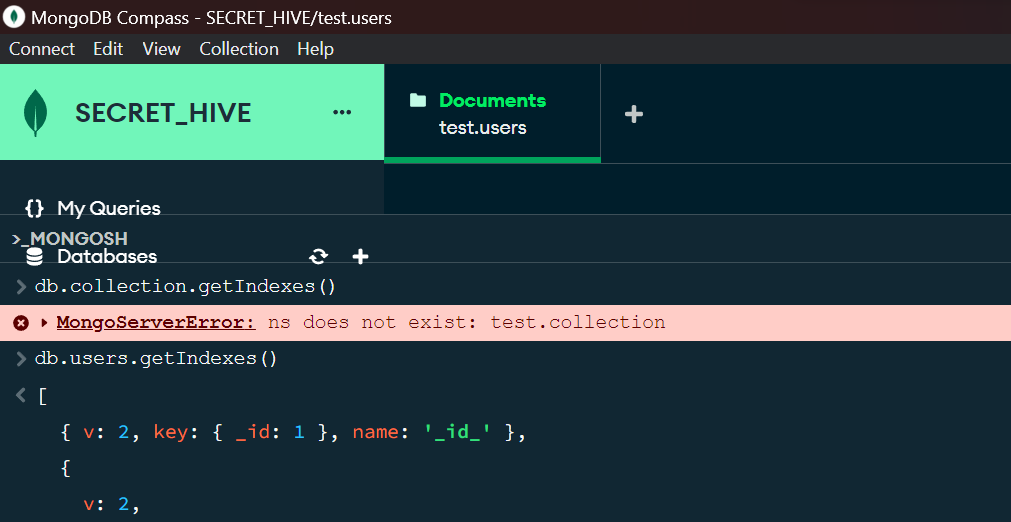
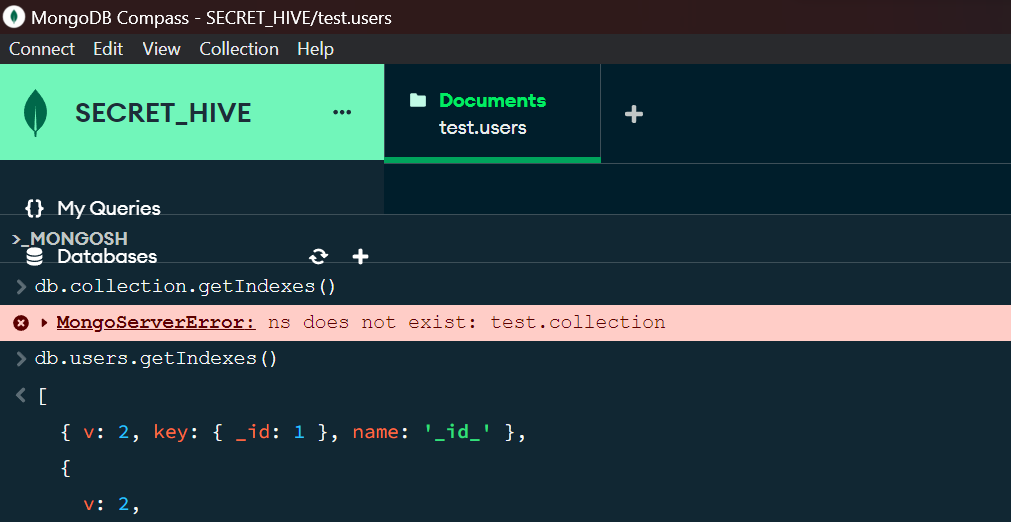
There is a problem with UI in compass, when mongosh pane in the bottom is scrolled up, the elements in the back are still visible on top of the mongosh pane.
See the attached screenshot, elements like My Queries, and Databases are still visible, when they shouldn't be.
Please be sure to attach relevant logs with any sensitive data redacted.
Steps to Reproduce
By opening up the compass, connecting to a mongodb database, and after connection, where you see your collections, there is a mongosh pane, in the bottom, that can be launched from the bottom right arrow.
After launching that pane, when you resize it and stretch it upwards.{}
What do you expect to happen?
Expected Results
The elements in the back, should get covered when mongosh pane is stretched up.
Actual Results
The elements in the back are still visible on top of the mongosh pane.